You start at 100%
Day one you're up early and everything's planned. Day nine, one bad night wipes it, and restarting costs more than starting did.
Nobody fails for lack of ideas. They fail because Monday's plan has nothing holding it up by Wednesday. Peak is the thing holding it up: the moves that matter today, a timer that shields your phone while you do them, and a coach that re-plans the week when it falls apart — because it will.
Free to download. No card to start. Elite is optional — $9.99/mo or $59.99/yr, billed by Apple, cancel in two taps.
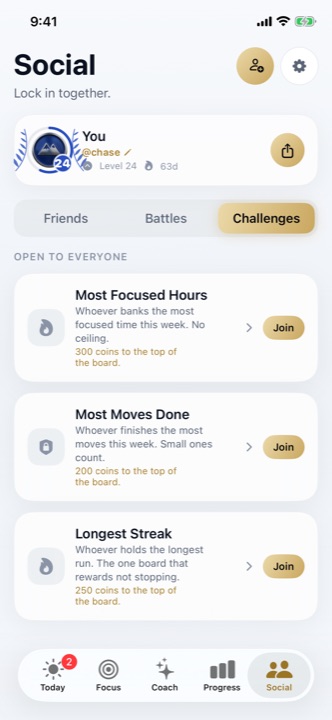
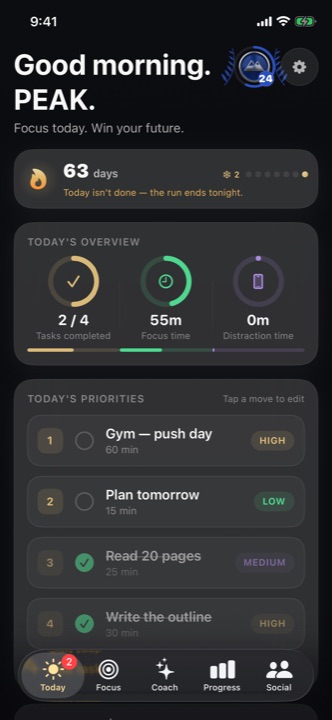
Real screenshot · Peak 2.0 · seeded with example data
Motivation is a spike, and spikes decay. Every system that has ever worked for a human being worked because it made the right thing small, visible, and slightly hard to skip. That is the entire design brief for Peak.
Day one you're up early and everything's planned. Day nine, one bad night wipes it, and restarting costs more than starting did.
Habits in one app, goals in a doc, focus in a timer, reflection nowhere. Nothing compounds because nothing is connected.
Skipping costs nothing today. Showing up earns nothing today. So the whole thing quietly stops mattering.
Real screenshots from the current build — not mockups. Scroll, or tap a dot to jump.
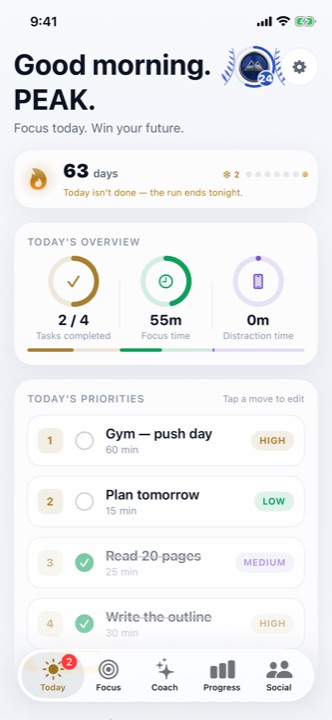
One screen, sized to a real day rather than an aspirational one: your streak, what today actually costs you in focus and distraction, and the handful of moves that move something.
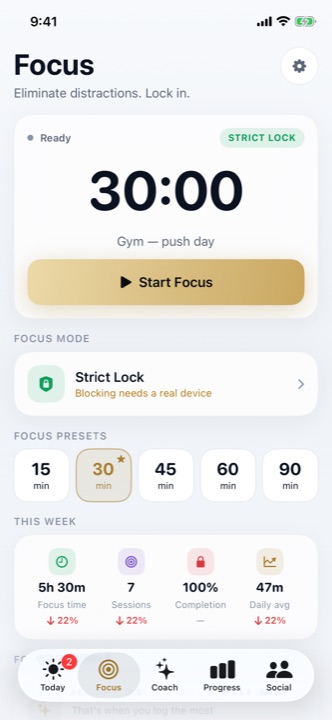
Pick a move, pick a length, start. Strict Lock hands enforcement to iOS itself, so the apps you chose are genuinely shielded for the session — not politely discouraged by a notification.
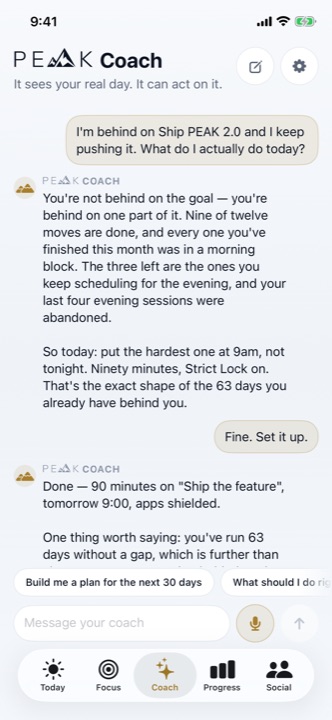
Not a quote generator. It can see your goals, your moves, your streak and how the last seven days actually went — so "I'm behind, what do I do" returns a re-planned week you accept in one tap.
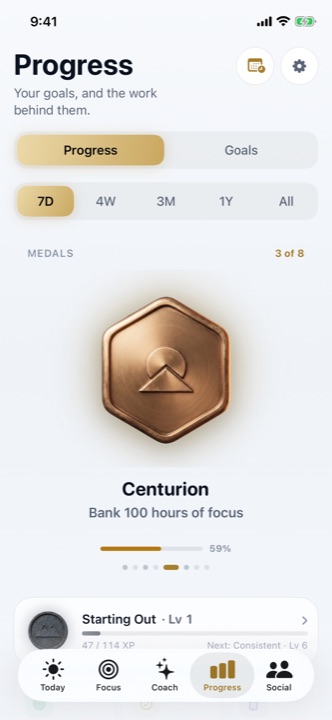
Ranks and medals that only real completions unlock, over windows from a week to all-time. The part nobody expects to care about, and then checks daily.
Add the two or three people who'd actually notice. Take a seven-day battle head to head, or join an open challenge scored on real focus time. Accountability is the oldest behaviour-change technology there is, and it still outperforms everything.
Tap a day. That's the entire interaction — one tap, once a day. Everything else in Peak exists to make that tap more likely.
One real outcome, in your words. Peak turns it into a plan with a visible route — not a wish in a notes app.
A short, specific list tied to that outcome. Start a focus session on any one of them and the timer decides for you.
Every completion banks XP, feeds the streak, and moves a real number. The proof accumulates whether you feel like it or not.
The next major release turns focus into currency. Distracting apps stay shielded until you've banked minutes, and the only way to bank them is to do the work. We're publishing the exact rates now so nobody is surprised by them later.
One Day Pass per week exists for the days real life wins. Timing and details may change before release — this section describes work in progress, not a feature you can use today.
The loop that changes anything — moves, focus, streaks, medals — is free and stays free. Elite is for people who want the coach and the analytics turned all the way up.
$0 / forever
No card. No trial countdown.
$59.99 / year
or $9.99 / month · about $5 a month billed annually
Elite is an auto-renewing subscription purchased inside the app and billed by Apple to your App Store account. It renews at the end of each period unless you cancel at least 24 hours before that period ends; manage or cancel any time in Settings → your name → Subscriptions. Prices are US dollars and may differ by region — the price shown at checkout is authoritative. See Terms of Use, Privacy Policy and billing help.
| Feature | Peak (free) | Elite |
|---|---|---|
| Active goals | 3 | Unlimited |
| Daily moves & focus sessions | Unlimited | Unlimited |
| Strict Lock app shielding | Included | Included |
| Streaks, shields, medals | Included | Included |
| AI coach | Standard | Priority & deeper context |
| Analytics window | 7 days & 4 weeks | Up to all-time |
| Themes & alternate icons | Porcelain & Obsidian | All unlocked |
| Friends, battles & challenges | Included | Included |
| Ads | None, ever | None, ever |
Your goals, your journal, the thing you're trying to quit — that is not analytics fodder. Here is exactly how we treat it, in plain English, with the long version linked.
Not to advertisers, not to brokers, not to anyone. There is no ad network in Peak and no plan to add one.
Coach messages go to OpenAI under an agreement that forbids training on them, and come straight back to you. AI Policy.
Account deletion is inside the app and it deletes, not deactivates. How to delete your account.
Peak doesn't follow you around other apps or websites, and never asks for your contacts to find friends.
Peak is a discipline tool, not medical or mental-health care. If you're in crisis, please reach a human — details in the AI Policy.
Peak is new. You will not find invented user counts or fake five-star quotes on this site. The screenshots above are the real app, seeded with example data so every feature is visible.

Free on the App Store. Five minutes to set your first goal. The only version of this that fails is the one you don't open.


Scan with your iPhone